Skip to content
Halocline
Factory planningWorkplace designCustomer storiesPricing
Start for free
Helpdesk
Submit a request
  • First steps
  • Application examples
  • System setup
  • Help
  • Data & Collaboration
    • Import data
      • Supported CAD formats and versions for import
      • CAD import options: CAD (coarse), CAD (fine), boxes, parts
      • Importing data at a glance: CAD, 2D layout, hall model
      • Importing a hall environment as a glTF file
      • Preparing a hall environment for import with Blender
      • Downloading sample data (demo data)
      • Using a 2D layout as a template (image, DWG, DXF)
      • Fill your library from a CSV file
    • Export data
    • Halocline Cloud
    • Point Clouds in VR
  • Layout planning
  • Process Analysis
  • Design for Manufacturing
← Import data

Downloading sample data (demo data)

1 min read

Available in
  • Desktop

Download #

  1. Open the info window via the info icon in the upper right corner
  2. Click on the category "Data"
  3. Click on "Select" under demo data
  4. Select sample data, click "Download" and wait until it completes
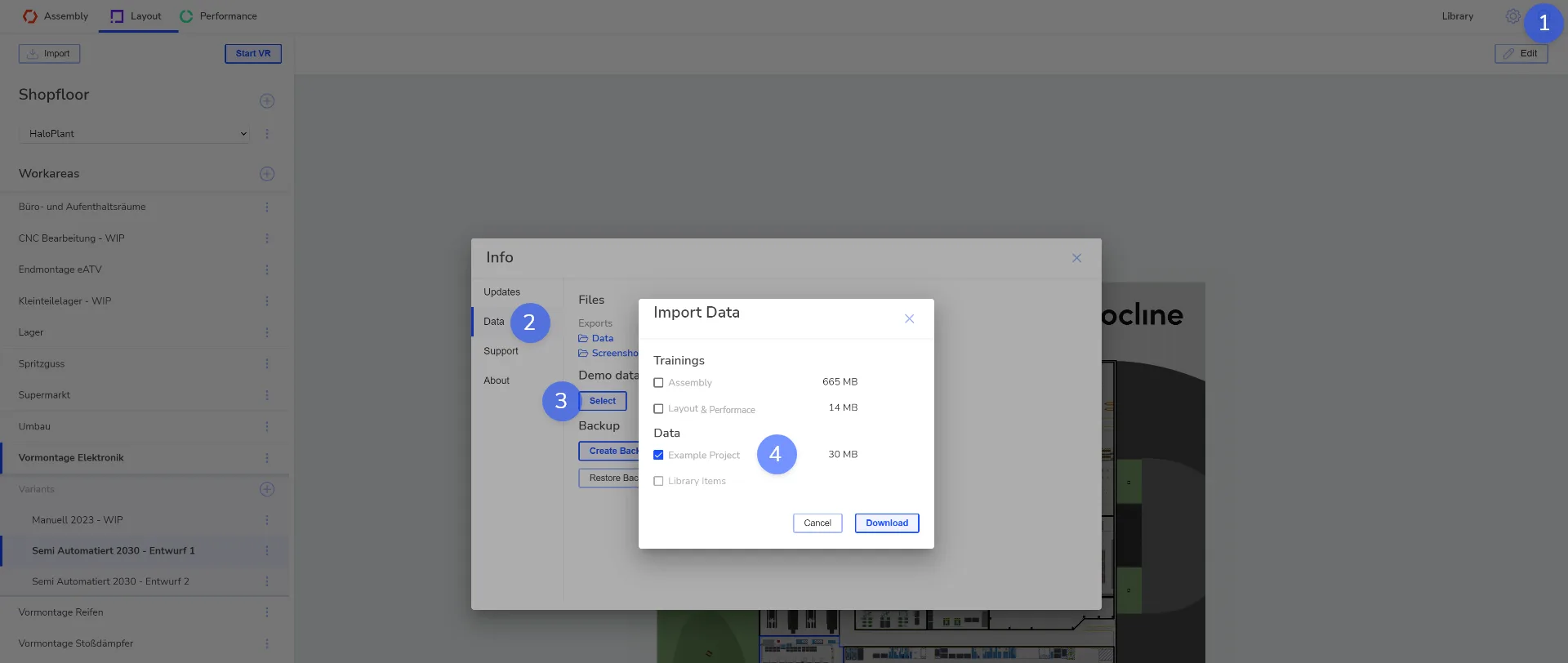
Info window in Halocline Desktop: under Data, click Select, choose the example project and start the download.

← Previous articlePreparing a hall environment for import with BlenderNext article →Using a 2D layout as a template (image, DWG, DXF)

Was this article helpful?

Still have questions? Submit a request

↑ Back to top
Halocline

Halocline GmbH & Co. KGNetter Platz 3, 49090 Osnabrück, Germany

+49 541 961045-0info@halocline.io

Product

  • Factory layout
  • Workstation design
  • All results
  • Pricing

Resources

  • Customer stories
  • Live demos
  • Knowledge
  • Helpdesk

Company

  • News
  • Contact
  • Educational organizations
  • Research projects

© 2026 Halocline. All rights reserved.

Legal noticeData protection