Sharing a shopfloor via the Halocline Cloud
1 min read
Available in
- Professional
- Add-On Cloud
- Desktop
With the Share feature, you can share a shopfloor with your organization via the Halocline Cloud. For each shopfloor, you decide whether you want it to be shared or remain available only locally on your device.
Instructions#
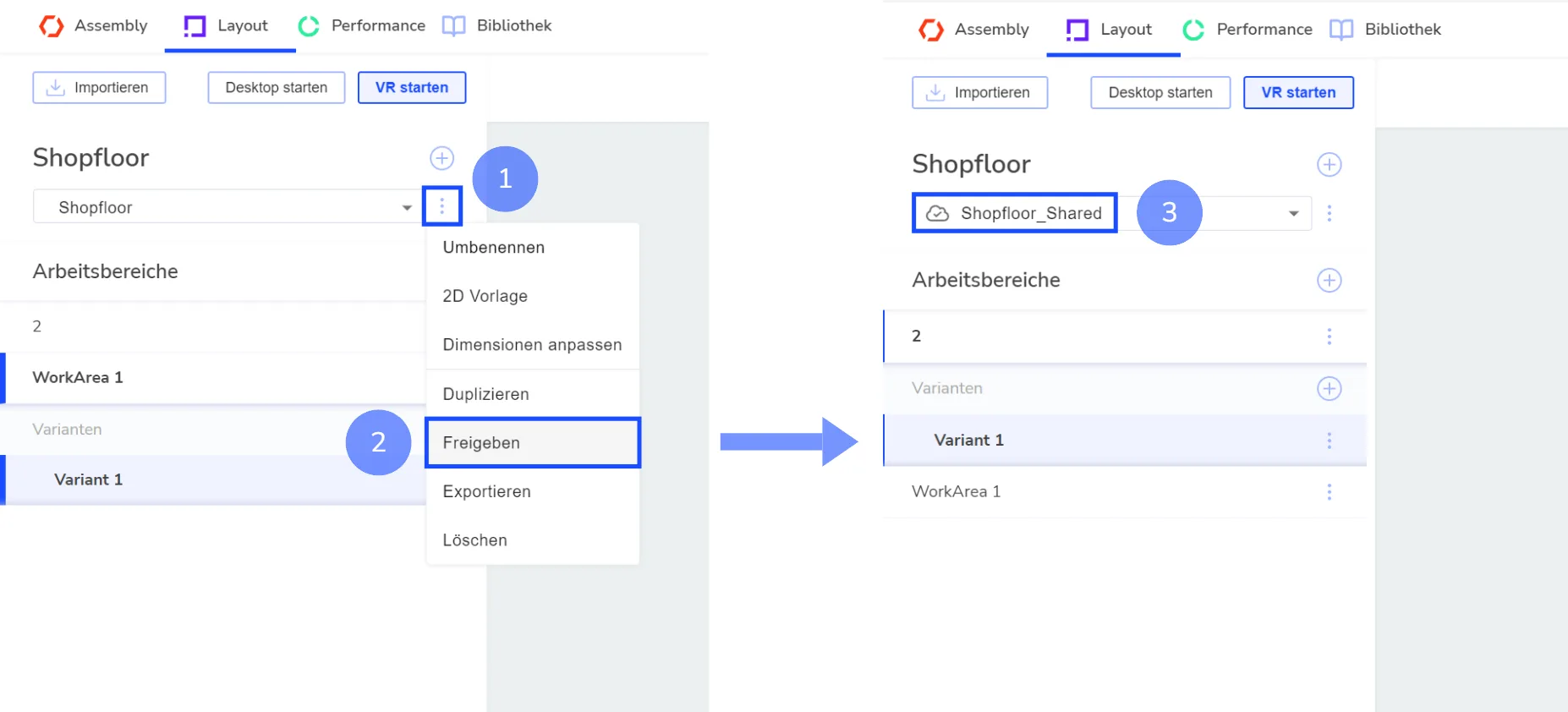
Shopfloor Overview › Three Dot Menu (1) › Share (2)
- In the shopfloor overview, select the shopfloor you want to share.
- Click the three dots (1) to open the context menu.
- Click on Share (2).
- Confirm the following prompt – a copy of the shopfloor will be created and uploaded to the cloud.
→ The shared shopfloor will appear with “_Shared” appended to its name and will be marked as shared with a cloud icon (3).
Note: The original shopfloor will remain locally under its current name. Changes made to this local copy will not be synchronized – it is not connected to the shared shopfloor. To avoid confusion, you can delete the local copy.
Tip: The initial upload may take some time, depending on the size of the shopfloor. After that, only the specific changes will be transferred – subsequent updates will be much faster.