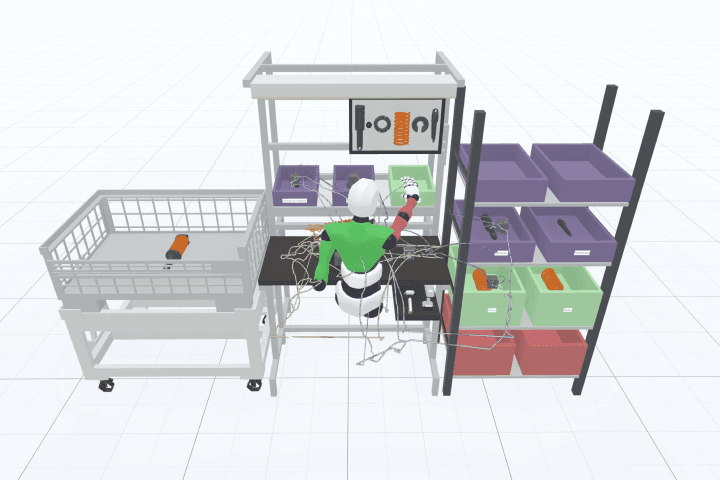
Spaghetti diagram from a recording.
See how far people walk before you rearrange a workstation. Record the process once, and Halocline draws the walking paths into a spaghetti diagram in the process report.
Why it matters.
Walking is invisible waste
Walking paths are hard to see on the line, so long and crossing paths go unnoticed.
Drawing by hand takes time
A spaghetti diagram on paper means observing, tracing and redrawing every path for each change.
Changes are hard to compare
Without the same diagram before and after, an improvement stays a claim.
How you get there.
Build the workstation
Lay out the workstation with its equipment and parts in Halocline Desktop.
Record the process
Go through the work once; Halocline records the movements and paths.
Read the paths
See the walking paths drawn over the layout of the workstation.
Export the process report
Hand over the diagram with the evaluation as an XLSX file.
What you hand over.
A spaghetti diagram of the recorded process: every path the worker walks, drawn over the layout of the workstation. It comes in the process report as an XLSX file, together with the evaluation of the process.
Format
- XLSX
Viewing and sharing as a link are always free. Files come with Team.
Who gets it
Industrial engineering, production management and the works council.
The question it answers
How does the process run, and where are the long walks?
Made from
A process recorded in Halocline and evaluated in the process report.
What's in it.
Walking paths
Every path of the recorded process, drawn over the workstation layout.
Density of lines
Where lines pile up, the same way is walked often.
Layout below
The equipment and areas the paths connect, so you see the cause.
Process evaluation
The rest of the process report next to the diagram, in one file.
What is a spaghetti diagram?
A spaghetti diagram traces the path of a worker, a part or a document through a process as one continuous line. Where the lines pile up and cross, there is waste: long walks, detours, searching. It is a classic lean tool and is usually drawn by hand on a printed layout. Halocline draws it from a recorded process, so you can compare before and after without drawing again.
More about the method →Questions people ask.
- Is there a spaghetti diagram template?
- In Halocline you do not need one: the diagram is drawn from the recording on top of the workstation layout. On paper, a printed floor plan and a pen are the usual template.
- Can I make a spaghetti diagram in Excel?
- Drawing paths in Excel by hand is tedious. Halocline delivers the finished diagram in the process report as an XLSX file, so you keep working with it in Excel.
- What is a spaghetti diagram used for in lean?
- It makes waste from motion and transport visible. Teams use it to argue for a new layout and to show the effect afterwards.
What customers get out of it.



Plan the factory. Hand over the results.
Start in the browser, without installation and with no CAD skills required.